What Happens When You Push a System to Its Breaking Point?
The project began with a deceptively simple challenge:
Sum one billion lines from two massive text files — without ever loading them into memory.
That constraint alone forces discipline. No shortcuts. No “just load it into a vector.” This is the kind of problem that reveals what your system really is — not what you wish it was. This project was built and executed on an Ubuntu VM running on Hyper-V. If I had executed this code on WSL, the performance would have been better, but the principles and outcomes remain the same.
To explore this further, the following tools were built:
numbers.sh – generates two files with 1 million random numbers each.
#!/bin/bash

echo "Let's generate two files with 1 million random numbers each..."

# Remove old files if they exist
rm -f file1.txt
rm -f file2.txt

# Record start time
SECONDS=0
start_time=$(date +"%Y-%m-%d %H:%M:%S")
echo "System time before process: $start_time"

# Generate 1,000,000 random numbers
for i in {1..1000000}
do
  echo $RANDOM >> file1.txt     # Append random number to file1.txt
  echo $RANDOM >> file2.txt     # Append random number to file2.txt
done

# Record end time
end_time=$(date +"%Y-%m-%d %H:%M:%S")
echo "System time after process: $end_time"

# Calculate elapsed time in seconds
elapsed=$SECONDS

# Convert elapsed seconds into hours/minutes/seconds
hours=$((elapsed / 3600))
minutes=$(((elapsed % 3600) / 60))
seconds=$((elapsed % 60))

echo "Random number generator is complete."
time_taken="Time taken: ${hours}h ${minutes}m ${seconds}s"
echo $time_taken

# Create results directory and write stats
mkdir -p results

files=("file1.txt" "file2.txt")   # array of files
results_file="results/wc_bash.txt"

for f in "${files[@]}"; do
    start_time=$(date +%s)
    sleep 1
    end_time=$(date +%s)
    time_taken=$((end_time - start_time))

    # Collect values into an array
    stats=(
        "$(date +"%Y-%m-%d %H:%M:%S")"
        "$(wc -l < "$f")"
        "$(wc -w < "$f")"
        "$time_taken"
    )

    # Append block to results file
    {
        echo "Selected File: ${f}"
        echo "Date: ${stats[0]}"
        echo "Line count: ${stats[1]}"
        echo "Word count: ${stats[2]}"
        echo "Time taken: ${stats[3]} seconds"
        echo -e "\n"
    } >> "$results_file"

done

echo "Word/line count and execution time written to results/wc_bash.txt"
createHugeFile.sh – generates two massive files (contents of generated files times 1000 = 1 billion).
#!/bin/bash

echo "Create huge files..."

for i in {1..1000}
do
  cat file1.txt >> hugefile1.txt
  cat file2.txt >> hugefile2.txt
done

echo
scenarioRunner.sh – orchestrates multiple execution strategies.
#!/bin/bash

declare -A scenarios
echo "<==== Scenario Runner =====>"
PROGRAM="./sumfiles"
RESULTS="scenarioRunnnerResults"

scenarios["SingleProgram"]="hugefile1.txt hugefile2.txt totalfile.txt full"
scenarios["TwoPrograms_FirstHalf"]="hugefile1.txt hugefile2.txt total_part1.txt range 1 500000000"
scenarios["TwoPrograms_SecondHalf"]="hugefile1.txt hugefile2.txt total_part2.txt range 500000001 500000000"

mkdir -p "$RESULTS"


for key in "${!scenarios[@]}"; do
    args="${scenarios[$key]}"

    echo
    echo "Running scenario: $key"
    echo "Args: $args"

    (
        /usr/bin/time -f "%e" \
            $PROGRAM $args \
            > /dev/null \
            2> "$RESULTS/time_${key}.txt"
    ) &
done

wait

echo

for key in "${!scenarios[@]}"; do
    echo "Runtime of ${key}: $(cat "$RESULTS/time_${key}.txt") secs."
done

echo
echo "Running scenario: Break into 10 files each and run all 10 sets in parallel"

split --numeric-suffixes=1 -l 100000000 hugefile1.txt "$RESULTS/huge1_" &
split --numeric-suffixes=1 -l 100000000 hugefile2.txt "$RESULTS/huge2_" &

wait

count=$(ls "$RESULTS"/huge1_* | wc -l) #Need to know how many files were created

id=""
chunks=()
for i in $(seq 1 "$count"); do
    chunks+=("$i")
    if [[ $i -lt 10 ]]; then
     id="0$i"
    else
     id="$i"
    fi

    (
        /usr/bin/time -f "%e" \
            ./sumfiles "$RESULTS/huge1_$id" "$RESULTS/huge2_$id" "$RESULTS/total_$id.txt" chunk \
            > /dev/null \
            2> "$RESULTS/chunk_time_${i}.txt"
    ) &
done

wait


for key in "${chunks[@]}"; do
    echo "Runtime of chunk (${key}): $(cat "$RESULTS/chunk_time_${key}.txt") secs."
done

echo "Combining text files into one..."
cat "$RESULTS"/total_*.txt > "$RESULTS/totalfile_10procs.txt"

echo
echo "Running scenario: Using multiple threads"

 (
    /usr/bin/time -f "%e" \
    ./sumfiles hugefile1.txt hugefile2.txt "$RESULTS"/threaded_total.txt threaded 10 \
    > /dev/null \
    2> "$RESULTS/threaded_time.txt"
) &

wait

echo "Runtime of multiple threads: $(cat "$RESULTS/threaded_time.txt") secs."


echo "All scenarios finished."
sumfiles.cpp – a single C++ program supporting four execution modes.
/*
  File: sumfiles.cpp
  Written by: Angel Hernandez
  Requirement: Create a program to produce a new file: totalfile.txt,
  by taking the numbers from each line of the two files while adding them. So,
  each line in file #3 is the sum of the corresponding line in hugefile1.txt and
  hugefile2.txt.

  This program has different execution modes based on the arguments.

  Usage examples:
    - Full (single-thread, whole files): ./sumfiles file1 file2 outfile full\
    - Range (single-thread, for halves): ./sumfiles file1 file2 outfile range
      start count
    - Chunk (single-thread, for pre-split chunks): ./sumfiles chunk1 chunk2
      outfile chunk
    - Threaded (multi-thread, N chunks/threads): ./sumfiles file1 file2 outfile
      threaded num_threads

  Compile with:
    g++ -O3 -std=c++17 sumfiles.cpp -o sumfiles
*/

#include <iostream>
#include <fstream>
#include <sstream>
#include <string>
#include <vector>
#include <thread>
#include <filesystem>
#include <chrono>
#include <cstdlib>

namespace fs = std::filesystem;
using Clock = std::chrono::high_resolution_clock;

// --------------------- BASIC SINGLE-THREAD MODES ------------------------

void sum_full(const std::string &f1, const std::string &f2, const std::string &out) {
    std::string line1, line2;
    std::ofstream outFile(out);
    std::ifstream in1(f1), in2(f2);

    if (!in1 || !in2 || !outFile) {
        std::cerr << "Error: cannot open files in full mode\n";
        std::cerr << "The selected files are [F1]]: " << f1 <<  " [F2]: " << f2 << " [OUT]: " << out << "\n";
        return;
    }

    while (std::getline(in1, line1) && std::getline(in2, line2)) {
        auto val1 = std::stoll(line1);
        auto val2 = std::stoll(line2);
        outFile << (val1 + val2) << "\n";
    }
}

void sum_range(const std::string &f1, const std::string &f2, const std::string &out,
               long long start, long long count) {
    std::string line1, line2;
    std::ofstream outFile(out);
    std::ifstream in1(f1), in2(f2);

    if (!in1 || !in2 || !outFile) {
        std::cerr << "Error: cannot open files in range mode\n";
        return;
    }

    // Skip to start line (1-based)
    for (auto i = 1; i < start; ++i) {
        if (!std::getline(in1, line1) || !std::getline(in2, line2))
            return;
    }

    // Process 'count' lines
    for (auto i = 0; i < count; ++i) {
        if (!std::getline(in1, line1) || !std::getline(in2, line2))
            break;
        auto val1 = std::stoll(line1);
        auto val2 = std::stoll(line2);
        outFile << (val1 + val2) << "\n";
    }
}

// For pre-split chunks: just sum all lines (same as full)
void sum_chunk(const std::string &f1, const std::string &f2, const std::string &out) {
    sum_full(f1, f2, out);
}

// --------------------- UTILITIES FOR THREADED MODE ---------------------

long long count_lines(const std::string &file) {
    auto count = 0;
    std::string line;
    std::ifstream in(file);

    if (!in) {
        std::cerr << "Error: cannot open " << file << " for counting\n";
        return 0;
    }

    while (std::getline(in, line))
        ++count;

    return count;
}

// Split both files into num_chunks contiguous, aligned chunks
void split_two_files_contiguous(const std::string &file1, const std::string &file2, const std::string &prefix1,
                                const std::string &prefix2, int num_chunks) {
    auto total = count_lines(file1);

    if (total == 0) {
        std::cerr << "Error: zero lines in " << file1 << "\n";
        return;
    }

    auto total2 = count_lines(file2);

    if (total2 != total) {
        std::cerr << "Warning: file line counts differ ("
                << total << " vs " << total2 << ")\n";
    }

    auto base = total / num_chunks;
    auto extra = total % num_chunks;

    std::ifstream in1(file1), in2(file2);

    if (!in1 || !in2) {
        std::cerr << "Error: cannot reopen input files for splitting\n";
        return;
    }

    std::string line1, line2;

    for (auto i = 0; i < num_chunks; ++i) {
        auto lines_this = base + (i < extra ? 1 : 0);
        std::ostringstream f1, f2;
        f1 << prefix1 << "_part_" << i << ".txt";
        f2 << prefix2 << "_part_" << i << ".txt";
        std::ofstream out1(f1.str()), out2(f2.str());

        if (!out1 || !out2) {
            std::cerr << "Error: cannot create chunk files for chunk " << i << "\n";
            return;
        }

        for (auto j = 0; j < lines_this; ++j) {
            if (!std::getline(in1, line1) || !std::getline(in2, line2))
                return;
            out1 << line1 << "\n";
            out2 << line2 << "\n";
        }
    }
}

// Sum corresponding lines from two chunk files (thread worker)
void sum_pair_file(const std::string &in1, const std::string &in2, const std::string &outFile) {
    std::string line1, line2;
    std::ofstream out(outFile);
    std::ifstream f1(in1), f2(in2);

    if (!f1 || !f2 || !out) {
        std::cerr << "Error: cannot open chunk files for threaded mode\n";
        return;
    }

    bool ok1, ok2 = true;

    while (!ok1 || !ok2) {
        ok1 = static_cast<bool>(std::getline(f1, line1));
        ok2 = static_cast<bool>(std::getline(f2, line2));
        auto val1 = std::stoll(line1);
        auto val2 = std::stoll(line2);
        out << (val1 + val2) << "\n";
    }
}

// Combine partial outputs into final file
void combine_outputs(const std::string &finalFile, const std::string &prefix, int num_chunks) {
    std::ofstream out(finalFile);

    if (!out) {
        std::cerr << "Error: cannot open final output " << finalFile << "\n";
        return;
    }

    for (auto i = 0; i < num_chunks; ++i) {
        std::string line;
        std::ostringstream f;
        f << prefix << "_part_" << i << ".txt";
        std::ifstream in(f.str());

        if (!in) {
            std::cerr << "Warning: cannot open " << f.str() << "\n";
            continue;
        }

        while (std::getline(in, line))
            out << line << "\n";
    }
}

// --------------------------- MAIN / MODES ------------------------------

int main(int argc, char *argv[]) {
    if (argc < 5) {
        std::cerr << "Usage:\n"
                << "  Full (single-thread, whole files):\n"
                << "    ./sumfiles file1 file2 outfile full\n\n"
                << "  Range (single-thread, for halves):\n"
                << "    ./sumfiles file1 file2 outfile range start count\n\n"
                << "  Chunk (single-thread, for pre-split chunks):\n"
                << "    ./sumfiles chunk1 chunk2 outfile chunk\n\n"
                << "  Threaded (multi-thread, N chunks/threads):\n"
                << "    ./sumfiles file1 file2 outfile threaded num_threads\n";

        return 1;
    }

    std::string f1 = argv[1];
    std::string f2 = argv[2];
    std::string out = argv[3];
    std::string mode = argv[4];

    if (mode == "full") {
        sum_full(f1, f2, out);
    } else if (mode == "range") {
        if (argc != 7) {
            std::cerr << "Range mode requires start and count\n";
            return 1;
        }
        auto start = std::stoll(argv[5]);
        auto count = std::stoll(argv[6]);
        sum_range(f1, f2, out, start, count);
    } else if (mode == "chunk") {
        sum_chunk(f1, f2, out);
    } else if (mode == "threaded") {
        if (argc != 6) {
            std::cerr << "Threaded mode requires num_threads\n";
            return 1;
        }
        auto num_threads = std::stoi(argv[5]);
        if (num_threads <= 0) {
            std::cerr << "num_threads must be > 0\n";
            return 1;
        }

        // 1) Create temp directory for chunks
        fs::path outPath(out);
        fs::path parent = outPath.parent_path();
        if (parent.empty()) parent = ".";
        fs::path tempDir = parent / ("tmp_threads_" + std::to_string(num_threads));
        fs::create_directories(tempDir);
        std::string prefix1 = (tempDir / "huge1").string();
        std::string prefix2 = (tempDir / "huge2").string();
        std::string outPrefix = (tempDir / "total").string();
        auto startTime = Clock::now();

        // 2) Split both big files into num_threads contiguous chunks
        split_two_files_contiguous(f1, f2, prefix1, prefix2, num_threads);

        // 3) Launch one thread per chunk
        std::vector<std::thread> threads;
        threads.reserve(num_threads);

        for (auto i = 0; i < num_threads; ++i) {
            std::ostringstream in1, in2, outChunk;
            in1 << prefix1 << "_part_" << i << ".txt";
            in2 << prefix2 << "_part_" << i << ".txt";
            outChunk << outPrefix << "_part_" << i << ".txt";

            threads.emplace_back(sum_pair_file, in1.str(), in2.str(), outChunk.str());
        }

        for (auto &t: threads)
            t.join();

        // 4) Combine chunk outputs into the final outfile
        combine_outputs(out, outPrefix, num_threads);

        auto endTime = Clock::now();
        auto ms = std::chrono::duration_cast<std::chrono::milliseconds>(endTime - startTime).count();
        std::cerr << "Threaded mode (" << num_threads << " threads) completed in "
                << ms << " ms\n";
    } else {
        std::cerr << "Unknown mode: " << mode << "\n";
        return 1;
    }

    return 0;
}
The goal wasn’t just to solve the problem. It was to measure, compare, and understand how different forms of parallelism behave under real pressure.
Four Strategies Enter the Arena
- Single-Threaded Full-File Mode
The baseline. Slowest. Purely sequential. But essential — because without a baseline, you can’t measure progress. - Two Processes (Half/Half Range Mode)
Two independent processes, each handling half the file. This introduces OS-level scheduling and parallel disk reads.
Result: Faster than baseline but limited by disk contention. - Ten Processes (Pre-Split Chunk Mode)
Ten processes hammering the disk simultaneously. On paper: more parallelism. In reality: more chaos.
Result: The slowest scenario — a perfect example of “more isn’t always better.” - Multithreaded Mode (In-Process Parallelism)
One program. Multiple threads. Shared memory. Aligned chunks. Unified page cache. Minimal overhead.
Result: Fastest overall — 124.83 seconds.
The Numbers Don’t Lie
| Scenario | Time (seconds) | Rank |
| Threaded (10 threads) | 124.83 | Fastest (1) |
| Single Program | 142.01 | 2 |
| Two Program (combined) | 183.15 | 3 |
| Ten Processes | 344.89 | Slowest (4) |
The takeaway is clear:
Parallelism is only powerful when it aligns with the bottleneck.
If the disk is the choke point, adding more workers just creates more contention.
What This Experiment Really Teaches Us
1. Hardware matters more than we admit.
2. Threads beat processes when memory locality matters.
3. OS-level parallelism is not a free lunch.
4. The best solution is rarely the most “parallel”.
Behind the Scenes: The Engineering Mindset
This project wasn’t just about code. It was about designing experiments, measuring real-world behavior, interpreting results with intellectual and factual honesty, and understanding the OS as a living system.
Images
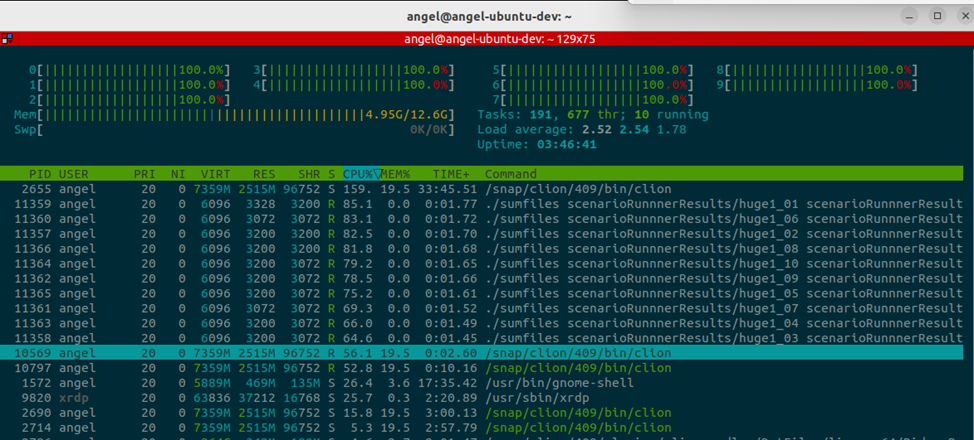
Image 1 – HTOP when multiple instances of sumfiles are running
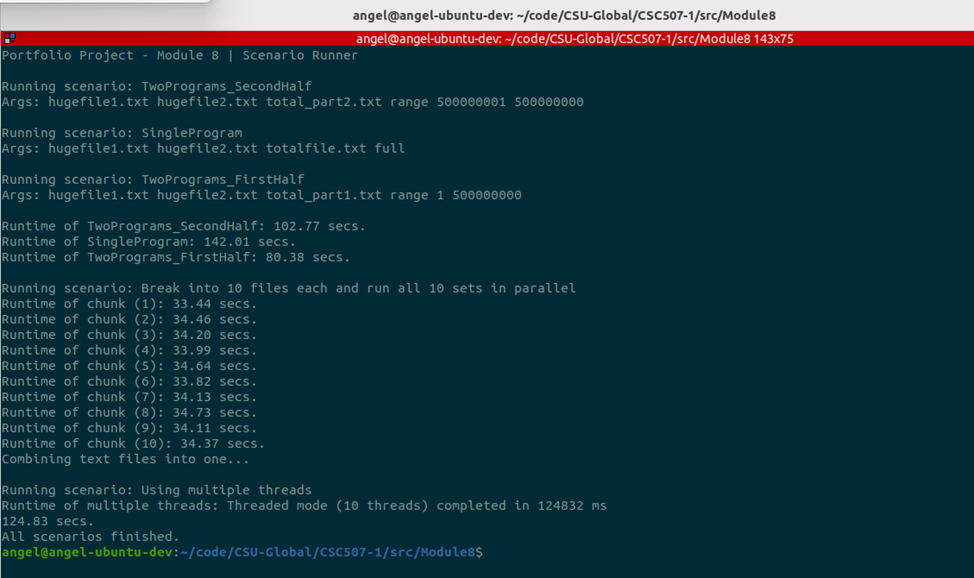
Image 2 – Output of scenarioRunner.sh showing timings for all scenarios
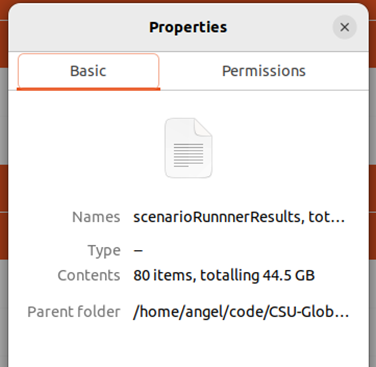
Image 3 – File and their sizes after running all scenarios
Conclusions
In summary, this project demonstrates several essential lessons about large-file processing and parallelism:
- Streaming I/O is essential when files exceed available memory.
- Parallelism helps, but only up to the point where the disk becomes the bottleneck.
- Two-process parallelism provides a noticeable improvement over the single-threaded baseline.
- Ten-process parallelism shows diminishing returns and may even slow down on mechanical drives.
- Multithreading within a single program is more efficient than launching multiple separate processes because threads share memory and benefit from unified read-ahead and caching.
- The fastest method depends on the hardware, especially the type of storage device.
Overall, the threaded implementation provides the cleanest and most scalable solution, while the multi-process experiments illustrate how operating systems schedule concurrent workloads and how I/O contention limits performance. In a nutshell, engineering isn’t about writing code. It’s about understanding systems.
References
linuxvox.com. (2025, November 14). Unleashing the power of parallel processing in Linux. Retrieved
from https://linuxvox.com/blog/parallel-for-linux
McKenney, P. E. (2023). Is parallel programming hard, and if so, what can you do about it?
Linux Foundation. Retrieved from
https://kernel.org/pub/linux/kernel/people/paulmck/perfbook/perfbook.html
Shukla, A. (2025, May 22). Threads vs. processes: When to use each and why. Savant. Retrieved from
https://blog.a2ys.dev/blog/threads-vs-processes
Silberschatz, A., Galvin, P. B., & Gagne, G. (2018). Operating system concepts (10th ed.). Wiley.
Retrieved from https://perlego.com/book/3866214/operating-system-concepts-pdf